

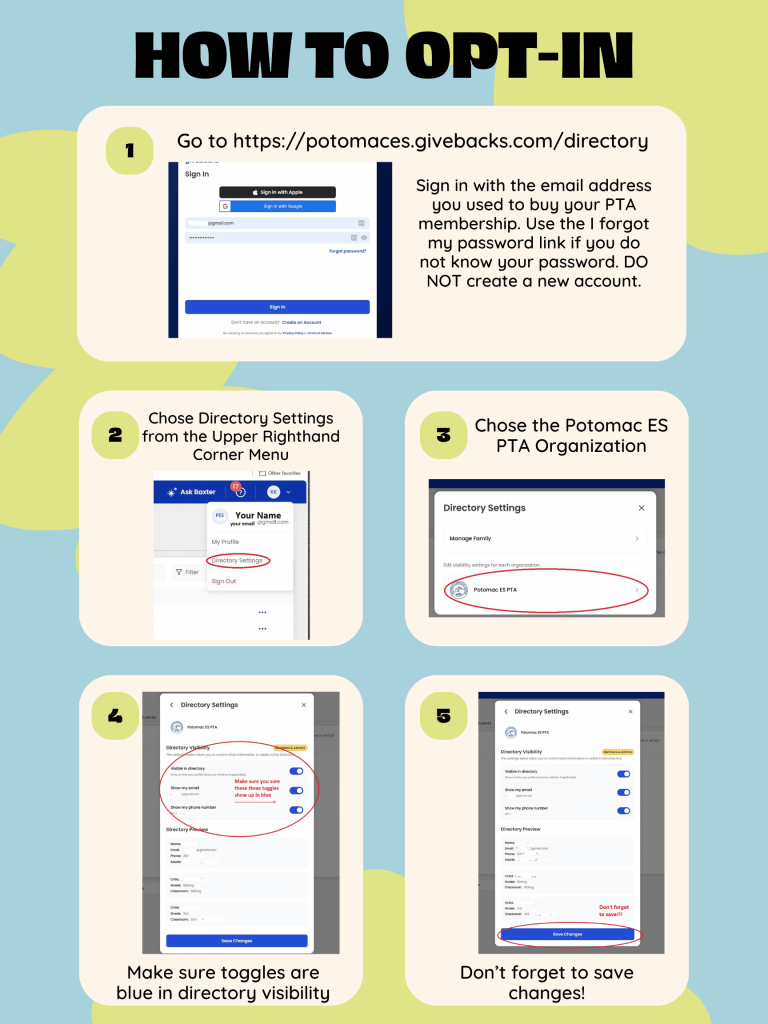
As a PTA member, you have access to the online directory. Those who are not PTA members do not have access, but will appear if they log in and confirm opt-in to the directory. You can search by parent/guardian or student name, view directory contacts by grade and PM teacher, and more.
Please take a moment to review your information and privacy settings, make any needed updates, and contact Jean Yeung, PTA Membership Chair, at jeanyeung@gmail.com with any questions or concerns. We hope you find the PTA online directory useful and appreciate your feedback.
To review your information and privacy settings
- Visit https://potomaces.givebacks.com/directory
- Sign in with the email address you provided when you registered as a PTA member this year (also the email this message is being sent to).
- Use the I forgot my password link if you do not know your password. DO NOT create a new account.
- Once logged in, again hover over the circular person icon at the top right of the page and select elect My Profile. (On mobile, click the three lines at the top right and select My Profile from the menu)
- Review your profile information for accuracy, and make updates as needed.
- Make sure to click the blue save button at the bottom of the page to save any changes.
- To hide any of your contact information within the directory, DO NOT delete it in your profile. Instead, go to Directory Settings and select “Potomac ES PTA”. Unselect any contact information you do not wish to display in the directory.
Note: if you hide your email, the PTA will still be able to email you important information like the weekly Mustang Mail, but your email will not be listed in the directory and PTA board members will not be able to view your email address to get in touch with you individually.
- Do not forget to scroll down and click Save Next!
- You can review directory information for your family and edit as needed by looking at Manage my Family under Directory Settings.
- If your children are missing, but you would like them included, please email Correspondence Secretary Stephanie.c.lake@gmail.com with their first name, last name, grade, and PM teacher. Or, if you need to update information for a child (such as adding a nickname), please email Stephanie.c.lake@gmail.com.
- Each adult that has an account in givebacks will need to review their information. If you have multiple adults and family units and need help consolidating them, please email Stephanie.c.lake@gmail.com
Tips for using the directory
- Sign in using the instructions above, and click Directory in the menu on the left bar. (On mobile, click the three lines at the top right and select Directory. If you do not see Directory, select Dashboard and then click the three lines at the top right and select Directory.)
- Use the search by name or email box to search for a specific individual (adult or child).
- To view a list of students by PM class, click on Students and then Filters at the top right, and select the grade or PM teacher. Only students whose parents have opted in to the directory will be visible.

